Curly Script Font for Web Design
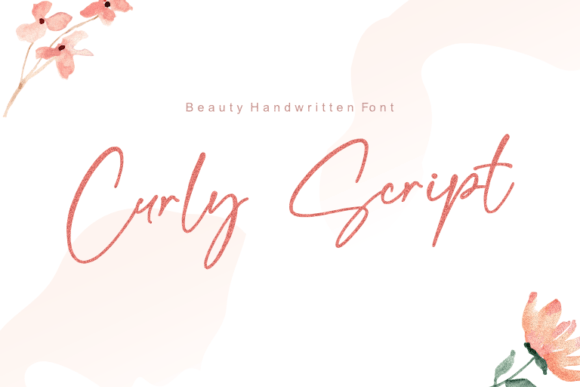
Curly Script is a delicate handwritten font that brings a touch of elegance and charm to digital design. Its dainty strokes and flowing curves make it ideal for projects that require a personal, romantic feel. As a web designer, you know that typography plays a crucial role in shaping the user experience and brand identity. Curly Script offers a unique opportunity to add character and warmth to your designs without sacrificing clarity or readability.
This script font works best in display contexts where its personality can shine. It’s perfect for headers, hero sections, and call-to-action buttons where visual impact matters most. However, it’s important to use it strategically. While Curly Script adds a sense of authenticity and creativity, it may not be the best choice for long blocks of text due to its intricate details and varying stroke widths.
Using Curly Script in Web Design
When integrating Curly Script into your website, consider how it interacts with other design elements. For instance, using it as a headline on a landing page can create an immediate emotional connection with users. A wedding invitation site, a boutique online store, or a creative portfolio might benefit from this font’s soft, handcrafted appearance. The font’s lightness helps guide the eye through the layout while maintaining a clean and organized structure.
For a coaching website or a product landing page, Curly Script can be used in section headings or feature titles to draw attention and evoke a sense of trust. Pairing it with a simple sans serif font for body copy ensures contrast and improves readability. This combination allows the decorative nature of Curly Script to stand out without overwhelming the reader.
Readability and Visual Hierarchy
Readability is a key factor when choosing a font for web design. Curly Script performs well at larger sizes, making it suitable for headlines and logos. However, on smaller screens or mobile devices, its fine details can become difficult to distinguish. To maintain legibility, avoid using it in small text sizes or on dark backgrounds without proper contrast. When placed over images or busy backgrounds, ensure there’s enough white space around the text to prevent visual clutter.
In responsive layouts, test Curly Script across different screen sizes to confirm that it remains clear and easy to read. If the font becomes too thin or distorted on smaller devices, consider using a bolder weight or adjusting the line height. These small tweaks can make a big difference in user experience.
Brand Tone and User Engagement
The personality of Curly Script aligns well with brands that aim to convey warmth, creativity, and authenticity. It’s particularly effective for businesses in the lifestyle, fashion, or artisan industries. A handmade soap company, a custom jewelry shop, or a digital course platform can use this font to reinforce their brand message and connect with their audience on a more personal level.
Using Curly Script in social media graphics or email newsletters can also enhance brand recognition. Its distinctive style makes it memorable and helps differentiate your content from competitors. However, consistency is key. Use the font sparingly and in ways that align with your overall design system to maintain a cohesive look across all platforms.
Font Pairing and Design Assets
When pairing Curly Script with other fonts, focus on creating balance and harmony. A modern sans serif like Roboto or Open Sans can provide a strong foundation for body text while allowing the script font to take center stage in headlines. Alternatively, a serif font such as Georgia or Playfair Display can offer a more editorial feel, especially for blog headers or content sections.
Ensure that your design assets include all necessary styles and file formats. Check if the font is available as a webfont so you can easily integrate it into your site without relying on external services. Also, verify that it supports multilingual characters if your audience speaks multiple languages. This will help maintain consistency and professionalism across all content.
Commercial Licensing and Digital Projects
As a web designer or digital product creator, it’s essential to understand the licensing terms of any font you use. Curly Script, being a freebie, may have specific restrictions on commercial use. Always review the license agreement to ensure compliance, especially when working on client projects, online stores, or digital templates. Some fonts allow for limited commercial use, while others require a separate license for broader applications.
When using Curly Script in a branded web experience, consider how it contributes to the overall identity. Whether it’s part of a logo, a banner, or a promotional graphic, the font should reflect the tone and values of the brand. By using it thoughtfully, you can create a more engaging and visually appealing digital presence that resonates with your audience.