Merlina Darling Font Review
As a web designer, I’m always on the lookout for fonts that bring both visual flair and functional clarity to a site. Merlina Darling is one of those rare typefaces that feels like it was made for digital design—especially when you’re working on creative projects where elegance and personality matter.
First Impressions: A Luxurious Script for Digital Projects
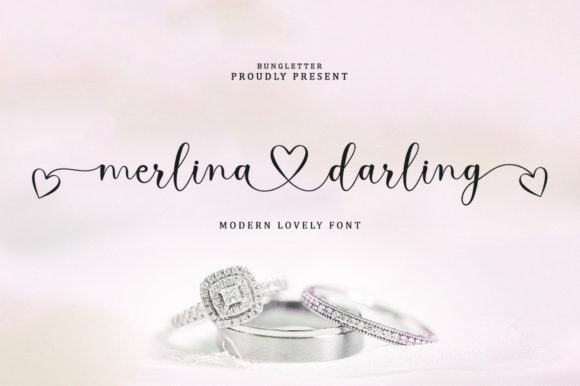
The first time I tested Merlina Darling in a hero section, I was struck by how effortlessly it elevated the overall tone of the layout. Its flowing curves and elegant connections give it a refined, almost handwritten feel that’s perfect for branding, headers, and decorative elements. It doesn’t feel overly ornate, which makes it more versatile than some other script fonts I’ve used before.
What stands out most is the font’s balance between detail and legibility. Even when used at larger sizes, Merlina Darling maintains its clarity without feeling cluttered. This makes it ideal for headlines, call-to-action buttons, or any place where you want to make a strong visual statement.
Testing Merlina Darling in Real Web Layouts
I ran through several scenarios to see how Merlina Darling performed in different contexts. On a product landing page, it worked well as a headline for a boutique online store selling handmade goods. The font added a touch of sophistication that matched the brand’s aesthetic without overwhelming the design.
When placed over an image banner, Merlina Darling held up nicely against busy backgrounds. Its high contrast and clean lines helped it stand out without needing extra styling. I also tested it on mobile screens, and even at smaller sizes, it remained readable and visually appealing.
One thing I noticed is that Merlina Darling works best when used sparingly. It’s not a font meant for long paragraphs or dense text blocks. Instead, it shines as a display font for titles, logos, and short phrases that need a bit of personality.
Use Cases: When Merlina Darling Fits Perfectly
Merlina Darling excels in situations where you want to add a touch of luxury or creativity to your design. For a portfolio website, it’s great for project headings or client testimonials. In a blog header, it can serve as a unique way to introduce a post or section.
For an online course sales page, Merlina Darling made the headline pop without competing with the body copy. I paired it with a clean sans serif font, which created a nice contrast and kept the design from feeling too ornate.
It also worked well for a coaching website’s hero section. The font gave the page a personal, approachable feel while still maintaining a professional edge. I found it especially useful for CTA buttons, where its elegant style helped draw attention without being distracting.
Limitations: When Merlina Darling Might Not Be the Best Fit
While Merlina Darling is a beautiful font, it’s not suitable for every use case. In particular, it doesn’t work well for small text, such as navigation menus, form labels, or accessibility-heavy interfaces. Its intricate details can become hard to read when scaled down, which could hurt usability.
It also isn’t the best choice for long-form content. If you’re designing a blog or article layout, Merlina Darling would be better suited as a heading or subheading rather than the main body text. That said, it’s a fantastic option for short phrases, logos, or decorative accents.
Another consideration is multilingual support. While Merlina Darling likely includes basic Latin characters, if you’re working with a non-English language, it’s worth checking whether all necessary glyphs are included.
Font Pairing and Web Design Tips
Pairing Merlina Darling with a simple, clean font is key to making it work well in a digital layout. A sans serif like Open Sans or a subtle serif like Georgia can provide a nice counterbalance, keeping the design from feeling too busy.
When using Merlina Darling in a responsive layout, I recommend testing it at various screen sizes. Make sure it looks good on both desktop and mobile, and consider adjusting the font size or line height if needed. Also, ensure that it has enough contrast against background colors, especially if you're using dark or textured overlays.
For web designers working on client projects, it’s important to check the licensing terms before using Merlina Darling on a live site. Make sure the font is available in webfont formats (like WOFF or WOFF2) and that the license allows for commercial use if necessary.
Final Thoughts: A Stylish Choice for Creative Websites
Merlina Darling is a standout font for web designers looking to add a touch of elegance and personality to their projects. Its luxurious style and refined details make it ideal for headers, logos, and decorative elements, especially in creative or boutique websites.
While it’s not a font for every situation, when used correctly, it can elevate the overall look and feel of a site. Whether you're designing a portfolio, an online store, or a marketing campaign, Merlina Darling offers a unique blend of beauty and functionality that’s hard to match.